
IT certification badge for professional development and career advancement
update

IT Certification Jump

update
  • Homepage
  • About
  • Good To Know
  • AI
  • Machine Learning
  • EXAM Traps 101
  • All Posts
  • Security
  • Cisco
  • CompTIA
  • AWS
  • Beginner
  • Cloud
  • Coding
  • Digital Forensics
  • EC-Council
  • Google
  • Java
  • Juniper
  • Linux
  • Microsoft
  • Project Management
  • Python
  • Uncategorized
  • Virtualization
  • VMware
  • Network Infrastructure
  • Hardware
  • Gaming
  • Good To Know
  • AI
  • Machine Learning
  • EXAM Traps 101
July 29.2026
1 Minute Read

Is This the Easiest Programming Language to Learn? Find Out!

Wondering which programming language beginners find easiest? Discover the language that makes coding simple and fun, and see how it can jumpstart your tech journey with less frustration and more success. Ready to unlock your coding potential effortlessly?
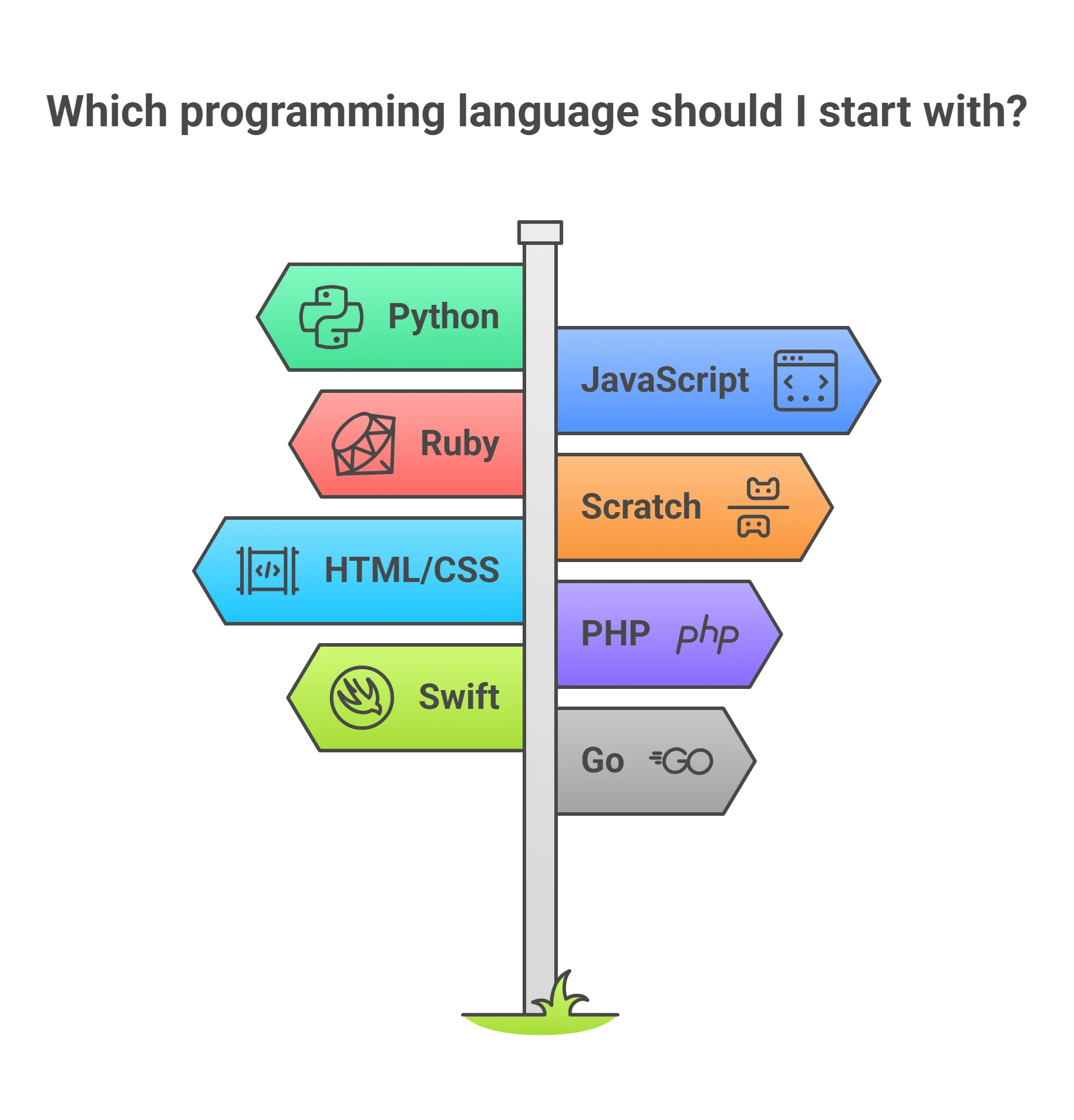
Discover Why the Easiest Programming Language to Learn Matters for Your Coding Journey

Choosing the easiest programming language to learn is a pivotal step for any aspiring coder. The path you start on can impact your confidence, pace, and overall success as you learn programming. A beginner-friendly, easy to learn programming language not only reduces the risk of early discouragement but sets a positive tone for your ongoing learning process. Starting with the right language means spending less time puzzled by syntax and more time mastering essential programming concepts and solving real problems.

For many, the journey into software dev, web development, or data science begins with a language that’s approachable and well-supported. The simplest programming language provides a smoother transition from thinking about logic to actually building things.

Strong community support, abundant learning resources, and clear error messages make learning less intimidating. Ultimately, your starting point shouldn't hold you back; it should invite you in, keep you motivated, and help you build skills that are in high demand on the job market.

Diverse group of beginners coding together, focused and smiling, learning the easiest programming language to learn in a modern classroom setting

How Choosing the Easiest Programming Language Impacts Beginners

For beginners, selecting an easy to learn programming language can make the difference between struggling to understand basic concepts and confidently creating your first working programs. Intuitive languages minimize confusion—a clean syntax with fewer special symbols (such as curly braces) means less time hunting for missed punctuation and more time seeing your code run as expected. With the right language, you can prototype creative ideas, build web pages, and even dabble in machine learning without years of prior experience.

Beyond ease of use, the plainspoken programming language is often supported by plenty of tutorials, online courses, and beginner-focused communities. This aspect is crucial since the initial learning process is often filled with questions and small errors, especially when you get your first error messages.

Having a supportive environment makes sense for new learners, turning what might be roadblocks into learning opportunities. In many cases, the fastest way to build foundational skills is simply to dive into a language designed for accessibility.

As you explore which language to start with, it's also helpful to consider how your learning environment and available tools can shape your experience. For those interested in hands-on experimentation and interactive learning, platforms like Jupyter Notebooks and Azure ML Studio offer beginner-friendly ways to practice coding and data science concepts. You can learn more about these practical tools and how they support new programmers in this field guide to Jupyter Notebooks, Azure ML Studio & Friends.

What You'll Learn

  • Key traits of the easiest programming language for beginners

  • Comparison of leading programming languages for ease of learning

  • Real-world applications made possible by easy to learn programming options

  • Expert insights on selecting the right beginner programming language

  • Strategies and resources to help you start learning quickly

What Defines the Easiest Programming Language to Learn?

Identifying the simplest programming language to learn involves more than counting how many people use a specific language. True beginner-friendliness is built into the language’s design. The ideal starting point features a clean syntax—meaning the instructions you type mimic everyday language as closely as possible and avoid unnecessary symbols or complicated structure. But ease of learning also comes from robust support, accessible documentation, and a forgiving approach to errors.

It’s not just about mastering the commands—a language’s ecosystem also matters. Popular languages with large communities will provide more abundant and diverse learning resources, making it easier to find help when you get stuck. For an aspiring software developer or a future data scientist, choosing a language with real-world relevancy and supportive infrastructure is key in reaching your goals quicker and with less frustration.

Core Features of an Easy to Learn Programming Language

Beginner coding in a minimalist editor using simple Python code, illustrating the easiest programming language to learn
  • Clear and concise syntax

  • Comprehensive learning resources

  • User-friendly error messages

  • High demand in the job market

"Many beginners credit clear syntax and robust learning resources as the most crucial aspects when starting their programming journey." – Dr. Karen Wu, Software Engineering Professor

Comparing the Easiest Programming Languages for Beginners
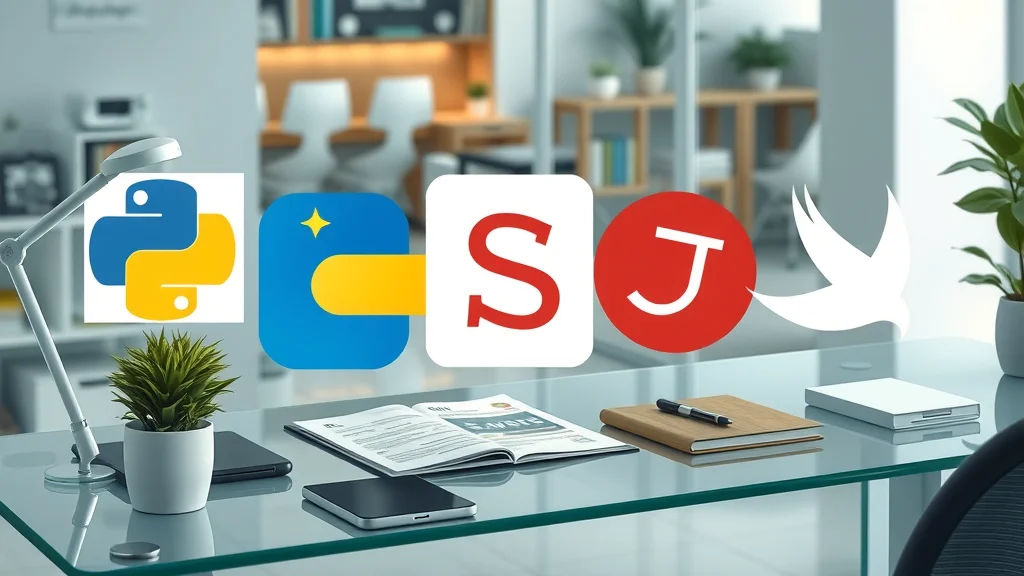
Collage of programming language icons (Python, JavaScript, Ruby, Scratch, Swift) representing the easiest programming languages for beginners to learn

Table: Side-by-Side Comparison of Easiest Programming Languages

Language

Syntax Clarity

Error Messages

Popular Use Cases

Community Support

Learning Resources

Python

Very high (English-like, minimal punctuation)

User-friendly, clear

Web development, data science, automation, scripting

Extensive, global

Extensive tutorials, docs, courses

JavaScript

High (familiar to many, some quirks)

Descriptive, browser-based

Building web apps, dynamic web pages

Very large, active

Lots of free online content

Ruby

Very high (readable, minimal symbols)

Helpful, beginner-oriented

Web backends, scripting

Welcoming, responsive

Comprehensive guides, books

Scratch

N/A (block-based visual coding)

Visual hints, instant feedback

Game creation, teaching kids

Friendly to young learners

Lesson plans, videos

Swift

High (especially with Swift Playgrounds)

Modern, clear

Mobile app, iOS, Apple devices

Rapidly growing

Official guides, interactive tools

Why Python Is Often Named the Easiest Programming Language to Learn

Enthusiastic beginner learning Python, the easiest programming language, in a cozy study space
  • Simple, English-like syntax

  • Widely available tutorials and guides

  • Versatility for web, app, and data projects

  • Active global community

"Python’s readability and straightforward approach make it a favorite for educators and first-time programmers alike." – David Kim, Senior Software Developer

Python stands out among easy to learn programming languages due to its approachable design and active ecosystem. Unlike some popular languages that require understanding curly braces or complex punctuation, Python’s clean syntax allows you to focus on problem-solving, not arcane grammar.

Its strong presence in web development, data science, and machine learning means your beginner projects can lead directly into high-demand fields without needing to relearn too much.

The overwhelming availability of learning resources—ranging from interactive tutorials to free bootcamps—ensures even absolute beginners have supportive pathways to success. Python’s error messages are typically clear and designed to help novices pinpoint and correct simple mistakes.

For many, it just makes sense: starting with a language that stays relevant as you grow your skills streamlines the learning process and maximizes your future job opportunities in tech.

Other Programming Languages Often Considered 'Easy to Learn'

  • JavaScript: Best for building web applications

  • Ruby: Praised for readable syntax and active community

  • Scratch: Visual learning for absolute beginners

  • Swift: User-friendly for building iOS and mobile apps

While Python is often called the most straightforward programming language to learn, other languages offer beginner-friendly experiences depending on your interests. JavaScript unlocks the ability to build web apps that work directly in the web browser.

Ruby’s clean syntax is beginner-friendly and is especially renowned for web backends, while Scratch takes a revolutionary approach with its block-based, visual interface, focusing on the absolute basics of logic and sequencing—perfect for younger learners or those who want a gentle introduction.

Swift is a great entry point if your aim is mobile app development, especially on Apple platforms. Each of these languages provides comprehensive learning resources to help beginners build web, mobile, or simple projects.

Real-World Applications and Demand: Building With the Easiest Programming Language

From Web Development to Mobile Apps: What Can You Create?

Diverse group of developers collaboratively building web, mobile, and data projects using easy to learn programming languages
  1. Build web platforms with JavaScript or Python

  2. Create mobile app prototypes using Swift or Python

  3. Develop automation scripts for daily tasks

  4. Explore data analysis projects

"Starting with an easy to learn language lets learners see quick results—be it a website, app, or a data project—which keeps motivation high." – Jessica Lee, Coding Bootcamp Instructor

With the simplest programming language to learn at your fingertips, you’ll be surprised how quickly you can move from basics to real-world projects. Whether you want to build web pages or entire web apps, try your hand at mobile app development, or automate daily tasks, the journey is far more manageable with the right starting point. For many, immediate results provide the encouragement needed to keep learning and to eventually contribute to both personal and professional projects.

The practical skills gained serve as stepping stones to more advanced fields like data analysis, machine learning, or even building full-fledged web backends. The accessibility, versatility, and fast feedback loop of beginner-friendly languages means that you can enjoy building things from day one, while steadily building your confidence and experience.

High Demand and Job Opportunities for Beginner Programmers

Motivated job applicant showing beginner coding project in interview, representing high demand for entry-level programmers
  • Common entry-level roles requiring easy to learn programming languages

  • Growing industries in tech, data science, and software engineering

The skills you gain by mastering an easy to learn programming language are sought after in a rapidly expanding digital job market. Roles such as junior software developer, QA tester, data analyst, and website content specialist all value practical coding ability—especially in languages widely recognized for their beginner-friendliness. Tech organizations recognize that programmers who have learned sought-after languages like Python or JavaScript can quickly adapt and grow into more complex roles.

As industries in web development, data science, and software engineering continue to grow, so does the need for talented developers with strong foundations. Beginning with the forthright programming language to learn is not just about simplicity; it’s a direct pathway into industries that are dynamic, lucrative, and future-proof.

"Employers are looking for solid foundational skills—starting with a beginner-friendly language puts you on the fast track to a coding career." – Priya Shah, Technical Recruiter, CodeBridge Talent

Common Challenges With Easy to Learn Programming Languages

Typical Error Messages and How to Overcome Them

Beginner coder troubleshooting error messages using the easiest programming language to learn, with clear focus on the learning process
  • Syntax errors and simple missteps

  • Read and interpret error messages

  • Where to get quick help: forums and documentation

Even the simplest programming language to learn will present stumbling blocks—most commonly, error messages that can seem confusing at first. Syntax errors, such as a missing parenthesis or misspelled word, are among the most frequent issues beginners encounter. The good news? Readable error messages and comprehensive online help make overcoming these obstacles less intimidating.

If you hit a snag, don’t get discouraged. Online platforms like Stack Overflow, the official documentation, and beginner coding forums are full of people ready to help. Learning how to interpret error messages is a crucial part of the process, and with consistent practice, you’ll find that troubleshooting becomes second nature. Think of every error as a learning opportunity—a stepping stone toward mastery.

Accessing Reliable Learning Resources for the Simplest Programming Language

  • Online tutorials and video series

  • Interactive coding platforms

  • Courseware from universities and bootcamps

Access to quality learning resources can define your experience as a beginner in programming languages. The best programming language for you is often the one with the richest ecosystem of tutorials, interactive labs, and community-created guides. Utilizing platforms like Codecademy, free online video classes, or university-backed courseware gives you structured, clear pathways to progress.

Many beginners also benefit from interactive coding environments where you can write, test, and debug your code instantly. These platforms provide instant feedback and allow you to learn by doing, which is proven effective for retaining new concepts. Don’t hesitate to explore university or bootcamp offerings if you prefer a guided experience—they’re often built around the easiest programming language to learn, ensuring your entry is smooth and rewarding.

Expert Tips: How to Make the Most of Learning the Simplest Programming Language

Strategies for Rapid Progress

Eager beginner achieving rapid progress by coding daily, using simple projects and community support
  • Code daily, even in small increments

  • Join beginner-friendly coding communities

  • Practice with mini projects

Rapid progress in programming relies on consistent practice and exposure to real code. Dedicate daily time—even brief sessions—to coding: this habit turns abstract concepts into practical skills through repetition and experimentation. Joining beginner-friendly communities (such as online forums, Discord groups, or local meetups) surrounds you with others on a similar journey, providing encouragement and accountability.

Focus on mini projects that interest you, whether it’s a simple web page, a data analysis script, or a game. Projects not only reinforce programming concepts but also produce tangible results you can show off or share.

Remember, building things is central to learning—real-world application cements what tutorials teach. By combining these strategies with a programming language designed for accessibility, you'll overcome obstacles and reach milestones quickly.

Leveraging Community Support and Real-World Practice

  • Collaborate on open-source projects

  • Attend code-alongs and workshops

  • Share your progress for feedback

Group learning programming and supporting each other in a beginner-friendly workshop environment

Community support amplifies your learning experience. Participating in open-source projects—or even just browsing their code—offers exposure to real-world practices and lets you contribute meaningfully as you learn. Code-alongs, hackathons, and hands-on workshops are perfect opportunities to build practical skills, meet mentors, and get your questions answered in real time.

Don’t be shy about sharing your progress, even if your project feels small—public feedback helps you grow and connects you to like-minded coders who can offer tips or encouragement. Remember, everyone starts somewhere, and the most important step is the one you take today toward mastering the easiest programming language to learn.

People Also Ask

Is C++ harder than Python?

Answer: For most beginners, C++ is considered more challenging due to complex syntax and stricter rules, while Python is widely regarded as an easy-going programming language to learn because of its readability and simplicity.

Comparison of Python and C++ code for beginners, focusing on readability as a key to the easiest programming language

Is 25 too old to start coding?

Answer: Absolutely not. There is no age limit for learning the simplest programming language or starting a career in programming. Many successful developers began coding later in life.

What coding did Elon Musk learn?

Answer: Elon Musk started coding with BASIC, an early and easy to learn programming language designed for beginners, before moving to more advanced languages over time.

Is coding harder than math?

Answer: Coding and math are different skill sets. The most comfortable programming language to learn often requires logical thinking more than advanced mathematics, especially for beginners.

Frequently Asked Questions (FAQs) About the Easiest Programming Language to Learn

Which programming language is best for absolute beginners?

Python is often the top recommendation for those just beginning their programming journey. Its straightforward syntax and robust ecosystem of learning resources make it ideal for understanding programming basics, building web pages, and starting with data projects. However, if your main focus is interactive web development, JavaScript is also extremely beginner-friendly.

How quickly can I learn the easiest programming language?

For most beginners, dedicated daily practice via tutorials and small projects can lead to basic proficiency in the easiest programming language to learn within a few weeks. Consistent effort and seeking help when needed will accelerate your progress. Choosing a language with ample community support and interactive platforms ensures you steadily build essential skills at your own pace.

Do I need a technical background to start learning programming?

No prior technical experience is required to begin with the easiest programming language to learn. Modern languages like Python are specifically designed to be approachable for non-technical learners, and most learning resources assume you’re starting from zero. The most important asset is curiosity and the willingness to experiment and learn from small mistakes.

Key Takeaways for Choosing the Easiest Programming Language to Learn

  • Python is often considered the top choice thanks to its readability and versatility.

  • Choose a language aligned with your goals—web, mobile app, or data science.

  • Leverage community support and abundant learning resources for success.

  • Beginner-friendly languages minimize frustration and maximize results.
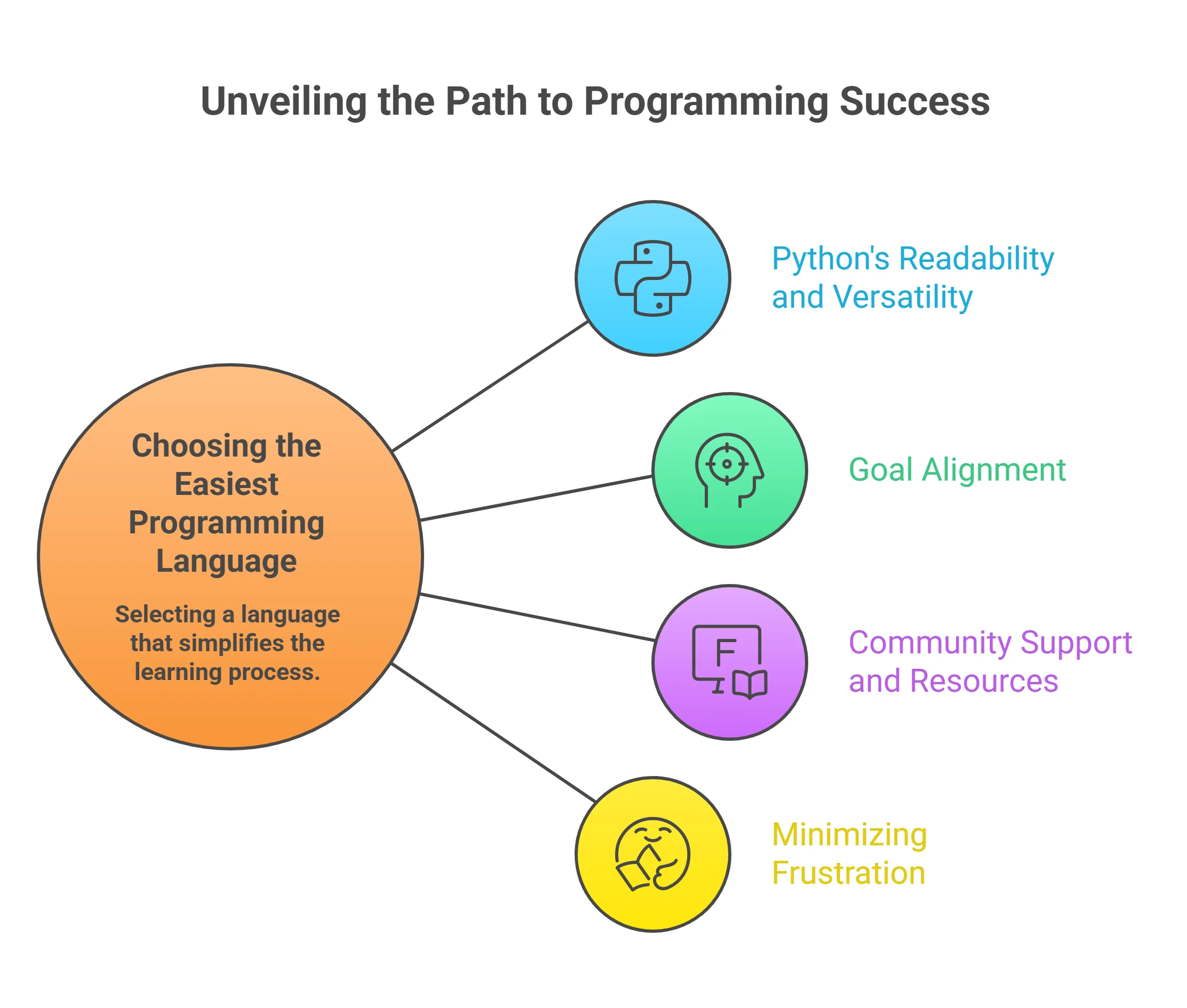
Ready to Start With the Easiest Programming Language? Your Next Steps

For more great IT certification training content, visit: ITCertificationJump.com

Conclusion

The easiest programming language to learn is your gateway to building confidence and unlocking future tech opportunities—choose wisely, persist, and your coding journey will be rewarding and empowering.

As you take your first steps into programming, remember that choosing an accessible language is just the beginning of your tech journey. If you’re still wondering whether an IT career is the right fit for you, or want to explore the broader landscape of opportunities and personal growth in technology, consider reading this comprehensive guide on discovering if an IT career is for you.

It offers practical advice, self-assessment tips, and insights to help you align your learning path with your long-term goals. Exploring these perspectives can empower you to make informed decisions, build confidence, and unlock new possibilities as you grow from beginner to tech professional.

Sources

  • freeCodeCamp – https://www.freecodecamp.org/news/what-are-the-easiest-programming-languages-to-learn/

  • Real Python – https://realpython.com/python-beginner-tips/

  • Codecademy – https://www.codecademy.com/resources/blog/best-programming-languages-to-learn/

When starting your programming journey, selecting a language that aligns with your goals and offers a gentle learning curve is crucial. For those interested in web development, JavaScript is indispensable, enabling the creation of interactive websites and applications. Its widespread use and immediate visual feedback make it a practical choice for beginners. (forbes.com)

Alternatively, if you’re aiming to develop applications within the Apple ecosystem, Swift provides a modern and readable syntax, making it accessible for newcomers. Apple’s support through tools like Swift Playgrounds further facilitates the learning process. (softensity.com)

Exploring these resources will help you make an informed decision and set a solid foundation for your programming endeavors. ITCertificationJump.com


Beginner

0 Comments

Write A Comment

*
*
Please complete the captcha to submit your comment.
Related Posts All Posts

Do IT Certifications Matter Without Experience? Here’s the Truth

Have you ever wondered if stacking IT certifications truly gives you an edge—or if employers still value hard-earned experience more? In today’s hyper-competitive tech job market, the debate around certification vs experience is louder than ever.Whether you’re just starting out or hoping to level up, knowing what hiring managers really want could be the key to unlocking career growth and landing your ideal job role. Let’s challenge what you’ve been told and uncover the truth.Are IT Certifications Worth It Without Experience? Challenging What You’ve Been ToldThe tech world can seem obsessed with certified professionals—every job posting or LinkedIn profile boasting a string of credentials. But is a certification enough to get your foot in the door if you lack actual work experience? Let’s break down the realities behind the emphasis on certifications, especially for early or mid-career tech pros.Certifications and experience act as powerful calling cards, especially for entry-level candidates. They promise hiring managers a certain foundational skill set backed by a reputable issuing organization. However, experienced employers know there’s a world of difference between passing a test and applying knowledge on the job. Certifications alone rarely tick all the boxes for job requirements , particularly for roles that demand hands-on problem-solving or workplace acumen.If you’re unsure whether certifications alone are enough to launch your career, understanding how employers evaluate certifications and experience is crucial. Let’s dig deeper into the trade-offs—and why relying on just one side of the equation can limit your potential for career advancement.For those considering which certifications can truly make a difference at the start of your IT journey, it’s helpful to explore which credentials are most valued by employers. You might find this overview of top entry-level IT certifications that actually get you hired especially useful as you weigh your options.What You'll Gain by Understanding Certification vs ExperienceDiscover how employers weigh certifications and practical experienceUncover which matters more for early and mid-career tech prosUnderstand how to balance your professional development for career growthCertification vs Experience: Defining the Debate in IT CareersThe ongoing debate of certification vs experience shapes hiring and promotion decisions in tech. On one side, certifications reflect structured learning and mastery of technical skills through training courses and exams. These credentials—sometimes even more than a college degree—show potential employers your dedication to your chosen field and your willingness to learn.On the other side, experience means practical, on-the-job lessons you gain through project delivery, teamwork, and day-to-day problem solving. It’s the evidence that you can translate textbook knowledge into real solutions—an area where experienced professionals stand out. Most hiring teams consider experience the clearest proof that you can adapt to fast-evolving job requirements in the tech world.What is the difference between certification and experience?Certification is often a badge earned by passing an exam or a series of training courses from a recognized issuing organization. It’s measured, objective, and easy for hiring teams to verify during the hiring process. Experience , by contrast, is tied directly to the work you’ve delivered in a real-world setting. That means exposure to the unexpected, developing a deep skill set beyond the theory, and gaining references from a previous employer to verify your capabilities.Crucially, both sides offer unique advantages. Certifications provide a quick proof of certain technical skills—even if you lack work experience—while experience confirms you can perform in a specific job role. Understanding the differences between certifications and experience is vital for shaping an optimal path for career growth.How Employers Weigh Certifications and Experience for Career GrowthThe approach to certification vs experience may vary depending on the employer’s needs, the tech sector, and the specific job. Entry-level roles often lean heavily on certifications because candidates may not have much practical exposure. Here, foundational credentials can open doors that might remain closed for those with only raw passion or informal learning.For mid-level and senior roles, however, hiring managers are laser-focused on proven work experience. They seek evidence that you can handle increasing responsibilities, lead teams, or drive significant results. Having both certifications and experience helps candidates stand out for promotions and strategic leadership opportunities.Certifications and Experience: Hiring Patterns in TechHiring FocusImportance to EmployersImpact on Career GrowthEntry-LevelCertifications Weighted HeavilyBoosts Initial Job ProspectsMid-LevelExperience and CertificationsUnderpins Promotions and PaySenior-LevelExperience DominatesDetermines Leadership RolesDoes Certification Count as Experience in IT Hiring?There’s a common misconception that simply holding a certification “counts” as equivalent to hands-on work experience. In reality, while certifications remain important, most hiring teams view them as evidence of theoretical or academic achievement—not as true substitutes for substantial, real-world learning.Certifications can show you’ve mastered concepts and can be a prerequisite to moving through an interview process , but they rarely check the same box as actually performing a specific job in the field.That said, certain certifications now embed practical labs or scenario-based testing—an attempt to bridge this gap. Even so, employers still weigh your ability to apply that knowledge through work experience above all. Certifications and experience both help you get noticed, but your experience is what ultimately convinces interviewers you can thrive in the role."Certifications may open the door, but experience walks you through." – Tech Industry LeaderCertifications and Experience: Which Is Better for Career Advancement?The question often isn’t which is better— certifications or experience —but rather how to use both strategically for career advancement. For those starting out, certifications in highly sought areas (cloud computing, networking, cybersecurity) can open doors that otherwise require years of work experience to unlock. You demonstrate a baseline of knowledge aligned with the latest technological standards.For those eyeing a mid-level or senior job role , experience takes top priority. It proves your resilience and ability to adapt in a dynamic environment. The best approach is to treat certifications as foundation stones—stepping stones toward greater responsibility, not as replacements for experience.Which is better, experience or qualification?Experts widely agree that in the world of IT and tech , neither certifications nor experience alone can carry your career forever. Qualifications can help you land that vital first or second role, but robust experience and a diverse skill set will propel you forward, especially when leadership or specialized expertise is required. Ultimately, the relative importance of each shifts as you advance in your chosen field.IT Career Growth: Balancing Certifications and ExperienceStriking the right balance between certifications and experience isn’t always clear-cut. For early-career professionals , obtaining respected foundational certifications—such as CompTIA A+, CCNA, or AWS Certified Solutions Architect—can signal instant value to employers. However, supplementing those certs with hands-on projects, internships, or even volunteer opportunities is what builds a comprehensive skill set recognized in any hiring process.As technology rapidly evolves, continuous learning is non-negotiable. Employers expect candidates to actively update skills through both training courses and real-world problem solving. Staying relevant is the only way to outpace the competition and consistently find new career growth opportunities as an experienced IT professional.Combine foundational certifications with hands-on projects to stand outLeverage internships and volunteer work to complement your technical credentialsContinuously update skills to stay relevant in the tech industryWhat's the Difference Between Qualifications and Experience?Qualifications , such as certifications, diplomas, or degrees, reflect your formal accomplishments through structured learning. Employers value these because they signify a standard of excellence verified by an external body. However, having only qualifications can sometimes signal a lack of the agility needed in ever-changing tech environments.Experience demonstrates how you perform when facing real-world challenges, from technical troubleshooting to managing teams and delivering against tight deadlines. While qualifications secure attention during the hiring process , experience sustains your momentum and builds leadership credibility. For holistic career advancement, both are essential—but rely too heavily on either, and you may encounter barriers to growth.Overcoming Common Misconceptions: Certifications and Experience in TechToo often, job seekers assume that certifications and experience alone will guarantee employment. Yet surveys of leading hiring teams show a clear pattern: certifications get you noticed, but without supporting evidence of real work experience or applicable technical skills , offers remain rare. Employers crave candidates who balance the rigor of structured learning with a demonstrable record of impact.The best path to career growth in tech is a balanced one—supplementing certifications and experience by actively accumulating hands-on skills, and constantly updating both as technologies evolve.Myth vs Reality: Do Certifications Guarantee a Job Without Experience?Myth: Certifications alone guarantee employment Reality: Most tech recruiters seek a blend of practical and theoretical knowledgeAnalysis: How Hiring Managers View Certifications and ExperienceIn recent video interviews with hiring managers, a common theme emerged. Most believe certifications validate determination and a desire to learn, which is helpful in the initial screening. Yet, when making final hiring decisions, these leaders rely far more on descriptions of previous employer projects, technical challenges overcome, and a clear fit for the specific job role. Balanced candidates—those who pair certifications with a track record of real results—are considered top talent and move fastest through the hiring process.Ultimately, while certifications may help "open doors," it’s your portfolio of experience and impact that delivers job offers and consistent career growth.Top Certifications That Can Accelerate Career Growth Without Traditional ExperienceCompTIA A+Cisco Certified Network Associate (CCNA)AWS Certified Solutions ArchitectMicrosoft Certified: Azure FundamentalsPeople Also AskWhat is the difference between certification and experience?Certification is a formal recognition that you have mastered a specific set of skills or knowledge—usually awarded after passing standardized exams or training courses. Experience is the hands-on practice you gain by actively working in the industry, solving real problems, navigating workplace challenges, and exceeding job expectations. Both play key roles in shaping a successful IT career.Does certification count as experience?While certifications demonstrate technical competence and knowledge, most employers consider them separate from actual work experience. Certifications boost your profile in job applications, but they do not replace the impact and credibility that come from performing a job in the field. Experience is earned through practice, not just study.Which is better, experience or qualification?It depends on where you are in your career growth. For entry-level candidates, a well-known certification can help you qualify for interviews and meet job requirements. In contrast, as you progress to mid-level or leadership roles, proven work experience becomes significantly more important in advancing your career.What's the difference between qualifications and experience?Qualifications—such as certifications, degrees, or diplomas—are formal markers of completed structured learning and skill assessments. Experience demonstrates your ability to thrive in real work environments, adapt to changing requirements, and contribute effectively to a team or organization. Combining both creates the strongest foundation for long-term career advancement.Industry Leaders on Certification vs Experience"A certification may get your resume past the first filter, but real progress demands proven results." – CTO, Global Tech Solutions"We hire for attitude and aptitude, but promote based on experience." – Senior HR Manager, Fortune 500 CompanyFrequently Asked Questions About Career Growth Through Certifications and ExperienceHow do I choose between pursuing certifications and gaining experience? Match your approach with your immediate goals: if you’re entering a new technical field, begin with foundational certifications to prove readiness for interviews. Simultaneously, seek internships or volunteer roles that provide hands-on experience.Can certifications help if I’m making a career switch? Absolutely. Certifications demonstrate commitment and knowledge, making you a credible candidate for entry-level opportunities in your new field—even if your past experience lies elsewhere.Will experience outweigh certifications as I advance? Yes. As you progress, employers prioritize leadership, adaptability, and past impact. These are proven through accumulated work experience, complemented by up-to-date certifications.Crafting Your Path: Blending Certification and Experience for Ultimate Career GrowthStart with relevant, respected certifications in your chosen IT fieldSeek internships or real-world projects to gain hands-on experienceContinuously update your certifications as technologies evolveDocument achievements and quantify your impact in each roleFinal Thoughts: Making Certification vs Experience Work for YouIt doesn’t have to be certification versus experience — it’s how you use both that counts. Let your certifications validate your knowledge while your hands-on work proves you can deliver in the real world. Treat them as stepping stones you can alternate between: study, apply, reflect, repeat, and you’ll supercharge your growth faster than choosing one path alone. Pick certifications that map to your goals, then turn every new concept into a small project, a portfolio entry, or an on-the-job win. Do that consistently and you’ll be unstoppable in the tech industry — so choose one cert to pursue and one project to build this week, and get moving.Ready to Take Charge of Your Career Growth?Whether you’re new to IT or looking to break through the next ceiling, don’t choose between certification vs experience —embrace both. Start your journey today and craft a path unique to your goals!If you’re eager to go beyond the basics and truly master the art of IT career development, consider exploring advanced strategies that blend learning with real-world application. Our comprehensive resource on IT certification success beyond the books dives deeper into actionable steps, mindset shifts, and proven techniques for long-term growth.By expanding your approach, you’ll not only stand out in a crowded field but also future-proof your skills as technology evolves. Take the next step and unlock your full potential in the tech industry.When evaluating the importance of certifications versus experience in IT careers, it’s essential to consider insights from industry experts. The article “Ask the IT Career Doctor: Certifications vs. Experience” on Dice.com emphasizes that while certifications can indicate knowledge in a given area, they don’t demonstrate the ability to apply that knowledge in the workplace. Employers often prioritize candidates with a proven track record of real-world contributions. Similarly, the piece “IT Certifications vs Experience vs Degree | What’s Most Important” from ITCareerFinder.com highlights that while certifications are valuable, real-world experience remains the best indicator of how well you will perform on a new job. Employers look to your actual experience to grasp how well you are able to execute in a work setting.If you’re serious about advancing in the IT field, these resources provide valuable perspectives on balancing certifications and practical experience to enhance your career prospects. ITCertificationJump.com

The Digital Filing Cabinet: Database Concepts for Beginners Explained Using Everyday Logic

Learning database concepts helps you understand how to organize, store, and retrieve information efficiently to prevent data chaos. Much like sorting groceries or pairing socks in a drawer, database management applies everyday logic to structure data so that it remains accurate, complete, and easy to access exactly when you need it.Why Learn Database Concepts for Beginners? (Opening with Everyday Logic)Ever felt overwhelmed by complex tech jargon? You're not alone. This guide explains how database concepts for beginners can be understood using practical, everyday logic. Say goodbye to confusion!What You'll Learn About Database Concepts for Beginners ExplainedCore principles of relational database and database managementHow a database management system worksEveryday metaphors to understand database structures and data organizationPractical uses for relational data and query languageReal-world applications and pathways to IT certificationWhat Is a Database? Understanding the Digital Filing CabinetBreaking Down Database Concepts for Beginners ExplainedWhat is a database?How does everyday life mimic a database system?Database management analogies (think sock drawers, kitchen cabinets, and more)A database is an organized collection of data—think of it as your digital filing cabinet for information. Instead of stuffing papers into drawers at random, a database stores data smartly, illuminating the chaos that often plagues our desks (and sometimes, our minds!). Everyday life is sprinkled with subtle nods to database systems.Consider your kitchen cabinet: plates, cups, and bowls have their own spots. This organization makes finding your favorite mug at 7:00 a. m. a breeze. Similarly, a database system crafts order out of digital data: files have their place, records are labeled, and everything can be located quickly.Diving deeper into database concepts for beginners explained, imagine your sock drawer. If socks end up everywhere but in pairs, morning routines get hectic fast. A good database management strategy means every sock (piece of information) is snug in its place—no chaos, no single mismatched sock left behind.Everyday logic, like sorting groceries or organizing folders for schoolwork, is essentially database management in action. It’s about storing information efficiently and keeping track of everything so you can easily access it when needed.Database Management: From Messy Desk to Digital HarmonyThe Role of Database Management in Organizing InformationWhat is database management?Why is database management system crucial for businesses and individuals?The myth of ‘fearless data wranglers’—anyone can organize like a pro!Database management is all about turning digital messes into neat, orderly systems. Imagine a desk buried in papers—finding an important note could take hours (or months, if you’re me). Now, what if every document was perfectly labeled and categorized? Welcome to the power of a database management system (DBMS)—it transforms digital disarray into harmony, just like cleaning a cluttered desk brings instant peace and productivity.From storing contact lists in your phone to tracking millions of inventory items in a global business, a DBMS ensures that data is structured, secure, and accessible in real time. This isn’t just for tech geniuses—even beginners can become so-called ‘data wranglers. ’Mastering fundamental concepts of database management means anyone can manage data efficiently, prevent information bottlenecks, and maintain order as digital information grows exponentially. Businesses thrive on this logic, individuals enjoy less stress, and the whole digital world becomes a little less intimidating.If you're interested in how foundational tech concepts can be made approachable, you might also enjoy this practical guide to understanding your laptop's essential features, which uses everyday language to demystify the technology you use every day."A good database management system is like the ultimate filing setup—everything has its place, and anyone can find what they need at warp speed."Types of Databases: Which Digital Filing Cabinet Fits Your Needs?Overview: types of database vs types of databasesRelational database: The classic organization methodNoSQL: When your collection gets quirkyFlat files, object-oriented, distributed, and moreNavigating types of database systems is like shopping for filing cabinets: there are options for every need, from simple to complex. The relational database—like a set of perfectly aligned drawers—organizes information in tables, each connected with logical relationships. When you want reliability and order, relational databases are the go-to (think SQL databases: structured, consistent, and easy to search).But sometimes, life (and data) gets quirky. Enter NoSQL databases: these are the wild, expandable shelves for unstructured or rapidly changing information—perfect for social media content or big data analytics. There are also flat file databases (simple, like a spreadsheet), object-oriented databases (storing data as objects, great for developers), and distributed databases (info scattered across many locations but acting as one). Each database system serves a unique purpose, from organizing playlists to running global e-commerce empires.Inside the Relational Database: Making Sense of Relational DataHow Relational Database Management WorksRelational database 101: tables, rows, and columnsWhy relational databases love order (but hate missing socks)Relational data and how it prevents chaosLet’s peek inside the relational database—the tried-and-true champion for structured data. Picture a series of well-organized tables: each has rows and columns, like a familiar spreadsheet. A row contains a single record (think: your friend Bob’s details), and a column stores a type of information (like all birthdays). The magic comes when tables are linked—for example, “People” and “Addresses” tied together—making data easily accessible and related, hence the name relational database.Relational databases are obsessed with order; they're designed to keep everything in sync (think: no more missing socks or duplicates that make laundry day a nightmare). When you store data as relational data, you guarantee accuracy, reduce chaos, and make it simple to query or update just what you need. Spreadsheets are fine for grocery lists, but when the large amount of information grows (like customer lists or order histories), a relational database is your best friend for avoiding a data disaster.Comparison of Relational vs Non-Relational DatabasesFeatureRelational DatabaseNon-Relational DatabaseStructureTables with rows & columnsFlexible models (documents, key-value, graph, etc.)Data ConsistencyVery strong (enforces rules)Often eventual (can be more flexible)Query LanguageSQL (Structured Query Language)JavaScript, JSON, proprietary APIsWhen to UseStructured data, clear relationshipsUnstructured or rapidly changing dataExamplesMySQL, PostgreSQL, OracleMongoDB, Cassandra, RedisMeet the Database Management System (DBMS)—Your Digital LibrarianHow a Database Management System Supports Everyday LogicWhat exactly is a database management system?How does a management system work behind the scenes?From Google search to pizza delivery: DBMS powers everyday tasksThink of the database management system (DBMS) as your personal digital librarian. When you ask where a specific book is, the skilled librarian doesn’t just know—it’s instantly fetched, in pristine condition! A DBMS does the same: when you need to store data or search for information, it seamlessly manages, secures, and retrieves everything with ninja-like efficiency.Behind the scenes, a DBMS is orchestrating order. It keeps data structured, controls access, enforces rules, and helps multiple users interact with the data at once—all without any shouting or trampled bookshelves.Everyday activities rely on DBMS magic: Google searches, email inboxes, online food delivery, and even organizing your photo library are possible because the management system is working tirelessly in the background.So whether you’re a casual user or aspiring IT professional, understanding the role of a DBMS is fundamental to mastering database concepts for beginners explained.Structured Query Language (SQL): Talking to Your Digital Filing CabinetStructured Query, Query Language, and Finding the Information You NeedIntroduction to structured query language (SQL) for beginnersQuerying like a pro: 'Find all the socks!' and other requestsWhy query language is your best friend for information retrievalWelcome to the secret language of databases: Structured Query Language (SQL). Imagine asking your filing cabinet to “Find all the blue socks. ” With SQL, that's not just possible—it’s instant. A query language lets you communicate directly with your database to retrieve, add, update, or delete records as needed.Learning basic SQL is like mastering the ultimate set of search-and-find commands. With just a few simple instructions, you can pull up that lost playlist, sort your favorite recipes, or extract contact information from years of digital clutter.SQL works behind the scenes in almost every app or website you’ve used that organizes information. Even if you’re not ready to program, understanding the logic of queries—think asking What do I need? Where is it stored?—is an essential part of database concepts for beginners explained."SQL is the language of databases—if databases are filing cabinets, SQL lets you ask: ‘Hey, where’s my stuff?’ and actually get an answer!"Everyday Database System Examples: Relatable ScenariosFavorite databases in common useDatabases in apps, social media, and e-commerceRelational databases keeping your playlists and contacts organizedIf you think database systems sound too “techy” for daily life, think again! Your phone’s contact list, streaming playlists, social media feeds, and online shopping carts are all powered by databases—often complex ones working quietly behind the curtain. Every time you browse a clothing store online, your choices are being matched to products and recommendations living in a relational database.Apps like Spotify or iTunes use relational data to keep playlists (rows and columns galore!) organized. Social platforms use database management to ensure posts, friendships, and likes show up in the right feeds. Even your grocery loyalty card relies on a real time database to update points and coupons the next time you shop.Learning these database concepts for beginners explained not only demystifies the tech but also shows how they make life smoother, more organized, and way more fun.Relational Data and Real-World ApplicationsHow Businesses Leverage Relational Database ManagementDatabases in banking, healthcare, and retailHow database systems streamline operationsReal-life database management disasters (and how to avoid them)Large businesses don’t just use database systems—they depend on them. Banks use relational databases to keep account balances accurate and transactions safe 24/7. Healthcare organizations store patient data to ensure the right records appear during your next checkup (without any embarrassing mix-ups). Retailers track inventory in real time, making sure that hot item in your cart isn’t out of stock (fingers crossed!).Robust database management ensures data is stored securely, transactions are processed efficiently, and that everyone—customers and employees alike—gets the information they need. However, the opposite is also true: database disasters (think: lost records, privacy leaks, or inventory mix-ups) underscore why understanding database concepts for beginners explained is so critical. With strong foundational knowledge, you’ll avoid common pitfalls, design better systems, and maybe even save the day at work.People Also Ask: Database Concepts for Beginners ExplainedWhat is a database management system and why is it important?A database management system (DBMS) is vital because it ensures data is structured, accessible, and secure. Think of it as an ultra-organized librarian who knows where every book (or data record) lives, and ensures only authorized people can check them out.What is the difference between a relational database and a flat file?A relational database links tables with relationships and enforces data consistency. A flat file is more like a single spreadsheet—good for simple data but messy and repetitive for complex work. Relational databases scale better as data grows.Can you learn database concepts for beginners explained without coding?Absolutely! Many concepts use real-life logic like organizing, labeling, and searching—skills that don’t require code. Coding helps you apply these concepts, but understanding the basics starts with analogies anyone can grasp.What are common types of databases used today?Common types include relational databases (SQL), NoSQL, hierarchical databases, object-oriented databases, and distributed databases. Each serves different needs and scales differently with data complexity.Animated overview—why databases matterEveryday examples of database systemsExpert tips on mastering database managementVisual walkthrough video explaining core database concepts for beginners, including analogies, interactive data animations, and key takeaways.Step-by-step video demo: Querying database management systemsRelational data in action with simple analogiesTable: Database Concepts for Beginners at a GlanceKey Database TerminologiesTermDefinitionEveryday AnalogyDatabaseAn organized collection of dataA neatly labeled filing cabinetDBMSSoftware that manages databasesThe librarian organizing the filesTableStructure of rows and columns for dataAn Excel spreadsheetRowA single record in a tableOne folder in the drawerColumnA type of data stored in all recordsTabs on folder labelsSQLLanguage for managing databasesInstructions for the librarianQueryA request for information from the databaseAsking the librarian for a fileNoSQLFlexible, new-style databasesAdjustable, expandable shelving systemQuick Reference List—Database Concepts for Beginners ExplainedKey features of a database management system:Organizes and stores data efficientlyProvides secure access and user permissionsEnables real time updates and queriesMaintains data integrity and prevents duplicatesMajor types of databases and their purposes:Relational Databases (SQL): Structured data, relationshipsNoSQL Databases: Unstructured, scalable dataFlat File Databases: Simple, single-table dataObject-Oriented, Distributed Databases: Advanced, multi-location needsEssential SQL commands everyone should know:SELECT: Fetch data from tablesINSERT: Add new dataUPDATE: Change existing dataDELETE: Remove dataFAQs: Answers to Common Questions about Database Concepts for Beginners ExplainedWhat skills are required for database management?Organizational skills, basic logic, attention to detail, and a willingness to learn new tools—all can be developed without advanced programming.Can I use database concepts for non-technical tasks?Absolutely! Organizing digital photos, budgeting, and even planning events use core concepts of storing, categorizing, and retrieving information.Best resources for continuing to learn database managementFree courses on sites like Coursera or Khan Academy, beginner-friendly books, and interactive platforms like W3Schools or Codecademy.Key Takeaways: Database Concepts for Beginners ExplainedDatabase management is easier than it soundsEveryday logic simplifies even the most complex systemsRelational databases and query languages put you in control of your dataUnderstanding these concepts is a big step towards IT certificationConclusion: Start Your Database Management Journey TodayLearning database concepts for beginners explained using everyday logic unlocks the power to manage, organize, and grow with data in a digital world. It's time to think like a database pro—with confidence and a sense of humor!Ready to take your foundational tech knowledge even further? As you build confidence with database concepts, consider exploring how these skills connect to broader IT certifications and security essentials. Our in-depth overview of cloud security essentials and certification pathways reveals how mastering data organization is just the beginning of your journey.Discover how database management, cloud technology, and security best practices come together to future-proof your digital expertise and open doors to exciting career opportunities.For More Great IT Certification Training Content, Visit: ITCertificationJump.comWant to understand databases without feeling like you need a computer science degree?Start with Database Design for Mere Mortals to build a solid foundation, then take the IBM Databases and SQL for Data Science course and the SQL for Beginners course to gain practical skills that employers and certification programs value. This combination provides both conceptual understanding and hands-on experience with real-world databases.Article Sources:Oracle – What Is a Database?IBM – What is a database?Codecademy – What Is SQL: Common Uses and Defining FeaturesTo deepen your understanding of database concepts, consider exploring the following resources:Basic Database Concepts - This article provides a comprehensive overview of fundamental database principles, including data organization, database management systems, and the importance of data integrity. (geeksforgeeks. org)Getting Started with Databases: Essential Guide for Beginners - This guide introduces key database concepts, such as different types of databases, their applications, and foundational knowledge necessary for beginners. (geeksforgeeks. org)These resources offer clear explanations and practical examples to help you grasp the essentials of database management.

Best Affordable IT Training Resources for Career Changers

Did you know that over 50% of tech professionals started their journey with budget IT training resources? This surprising statistic highlights just how transformational these affordable classes can be for those looking to break into the world of technology.Whether you’re a beginner with no tech experience or a seasoned professional aiming for project management roles, budget IT training is a real game-changer. Dive into practical tips, find the top platforms, and learn how you can unlock high-paying salary budgets—without breaking the bank. Your new future in IT starts here.Unlocking Career Opportunities: Why Budget IT Training Is a Game-Changer"Did you know that over 50% of tech professionals started their journey with budget IT training resources?" This underlines the accessibility and transformative potential of budget classes for aspiring tech workers.The importance of affordability for career changers: Career changers often pause at the high cost of traditional IT degrees or extended bootcamps. Budget IT training removes this hurdle, empowering more people to consider rewarding cash flow roles in technology.How budget IT training removes barriers to entry: These lower-cost solutions provide the same learning opportunities and practical skills as expensive programs, enabling those with a tight financial plan to enter high-demand fields like project management, software engineering, and budget office administration.Quick overview of key benefits: Budget IT training offers unparalleled flexibility and scalability. Courses can be taken at your own pace, on your own schedule, and many are recognized by employers looking for candidates taught by experienced instructors. Achieving certifications on a budget is now more attainable than ever.Affordability is more than just a perk—it’s the foundation for building a new career. For individuals eyeing a career switch, budget IT training offers opportunities previously out of reach. Not only do these options cut costs, but they also allow you to be strategic about how, when, and where you build critical skills such as project management and financial analysis. With industry recognition becoming more democratized, budget classes are an essential investment in yourself—regardless of the size of your training budget.As you explore affordable IT training options, consider how foundational certifications can accelerate your entry into tech. For example, the CompTIA Tech+ certification is a popular starting point for those seeking practical, industry-recognized credentials without a hefty price tag.Navigating the Landscape: What Budget IT Training Offers Career ChangersTypes of budget IT training: Online courses, intensive bootcamps, and self-paced programs cover everything from operating systems to project management fundamentals. Platforms like Coursera, Udemy, and LinkedIn Learning provide specialized learning budget paths that accommodate even the busiest schedules, while still delivering hands-on technical skills.Comparison of free vs. low-cost vs. premium budget classes: Free courses are excellent for basic concepts and hands-on practice, though they might lack industry-recognized credentials. Low-cost classes strike a balance between affordability and quality, often including budget office and capital budgeting units. Premium “budget” offerings—often deeply discounted—may include certification vouchers and expert mentorship, further enhancing overall value.How to assess course content and value: Check curriculum coverage, depth, and whether essential skills such as communication skills or financial analysis are included. Top budget IT training courses break down even complex topics—for instance, government budgeting and capital budgeting—into easy-to-digest, beginner-friendly segments. User reviews and testimonials are invaluable for verifying an offering’s credibility and real job placement success.The sheer diversity of budget IT training resources ensures you’re not limited by your educational background or budget entry point. Many courses are structured for the complete beginner and have clear paths toward specialization—like transitioning from a basic IT support course to advanced project management or budget analyst roles. Take time to compare offerings based on your individual fiscal year career goals, desired salary budgets, and preferred learning style.Key Factors to Consider When Choosing Budget IT Training CoursesAccreditation and industry recognition: Courses affiliated with reputable institutions—such as the University of Georgia or widely recognized industry partners—offer a stronger return on investment, especially for those aiming for positions in the public sector (including local government).Curriculum depth and coverage: Ensure the content is current and comprehensive. Look for courses teaching software engineering, capital budgeting , and project management basics , all the way through to advanced financial analysis and cash flow management.Instructor qualifications and reputation: Seek out training courses taught by experienced professionals whose credentials can be verified. This often leads to better real-world skill transfer and communication skills development.User testimonials and career outcomes: Check user reviews, LinkedIn endorsements, or independent forums to gauge the course’s success rate—particularly for students who successfully complete budget IT training and land jobs as budget analysts, project managers, or IT support professionals.Alignment with your personal training budget: Evaluate not only the upfront cost but also the long-term value, such as lifetime access, included certification exam vouchers, and ongoing access to training videos or budget office support communities.When comparing classes, prioritize options that map directly to your job aspirations—whether you’re after a budget analyst or budget manager position, or aiming for a hybrid skillset that includes both IT and project management. Remember that your investment is not only about cash flow but also about opening doors to broader position budgeting roles and better salary budgets down the road.Top Platforms Offering Budget IT Training and Budget ClassesOverview of Highly-Rated Budget Classes for IT ProfessionalsCoursera: Offers industry certificates, free trials, and affordable plans. Organizations like Google and leading universities (such as the University of Georgia) regularly partner with Coursera to deliver practical, job-ready IT training.Udemy: A massive catalog of budget classes—ranging from cybersecurity to budget office skills—Udemy’s flexible pricing and frequent discounts make it easy to upskill on a tight financial plan.edX: Partnership-driven with hundreds of courses from top-tier academic and industry partners. EdX is a great place for training in capital budgeting, governmental training practices, and advanced technical specialties.LinkedIn Learning: Features IT and project management budgets courses, plus budget office training materials designed to elevate communication skills and enhance your resume for hiring managers.PlatformCourse RangePricingAccreditationProject Management ContentCourseraIT Support, Cybersecurity, Budget Office, Project ManagementFree - $49/monthYes (university, industry)Yes, beginner & advancedUdemySoftware Engineering, Budget Classes, Operating Budget Basics$10-$30/course (frequent sales)Certificate of CompletionYes, beginneredXCapital Budgeting, Government Budgeting, Data Analytics, ITFree (audit), $50-$300/certificateYes (university)Yes, project management, public sector focusLinkedIn LearningProject Management, Communication, Budget Analyst Training$39.99/month (one-month free trial)Industry RecognitionYes, practical & role-specificEach of these platforms boasts courses designed for budget entry learners as well as intermediate and advanced students seeking subject mastery or specialization. What sets them apart is the ability to blend wide-ranging content—for example, combining financial analysis , cash flow management, and project management —to create a holistic, job-ready skillset. Most also offer progress tracking and certification badges to showcase on your resume or LinkedIn profile.Stretching Your Training Budget: Tips for Maximizing Return on InvestmentUtilizing free trials and scholarship programs: Many platforms provide free trials or access to scholarship-funded budget IT training courses. These can significantly lower the financial barrier, letting you explore courses in project management, software engineering, or budget office skills before committing long-term.Combining budget classes for holistic skill-building: Stack multiple, complementary courses to strengthen both technical and soft skills. For instance, pairing a cash flow fundamentals course with a communication skills workshop or beginnerâ project management class for maximum versatility.Focusing on versatile skills: Emphasize foundational knowledge that easily adapts to various industries such as project management, financial analysis, and capital budgeting. These form the backbone for many IT and budget analyst positions.Tracking personal progress and outcomes: Measure results by reviewing completed certifications, improved learning budget metrics, or increases in position budget status. Use tools like digital checklists, progress dashboards, and goal-setting planners to stay accountable.To get the greatest return on investment from your training budget, become an active learner—always looking for discounted offerings, employer-sponsored programs, or budget training partnerships with governmental training and local government organizations. This proactive approach transforms even small investments into substantial career advancements.Real Stories: Career Changers Who Succeeded with Budget IT Training"After switching from retail, budget IT training courses helped me land my first helpdesk job in under six months." – Jasmine, Junior IT AnalystProfiles of individuals leveraging affordable resources: People from all walks of life—retail, education, administration—successfully complete budget classes and transition into IT with higher salary budgets and better benefits. Jasmine, for instance, credits her rapid advancement to online project management and budget training courses, which gave her both technical and budget office skills.Notable achievements and salary budget improvements: Many report doubling their earning power within a year, with some exceeding the average position budgeting expectations through targeted certifications and budget analyst specializations.Common hurdles and how they were overcome: Time management is the most common obstacle. By leveraging self-paced courses, carefully budgeting study hours, and connecting with online support forums, learners persist even with full-time jobs and family obligations.You’ll find countless career changers who started with zero tech experience, utilized a targeted financial plan, and built new careers as budget managers, IT analysts, or entry-level software engineers through affordable online training. Their common trait? A commitment to continuous learning and smart use of every training resource—proof that even modest budget entries yield strong returns.What You Must Know: Budget IT Training and Career AdvancementCertifications that have the highest ROI on a limited training budget: Google IT Support, Microsoft Office Specialist, CompTIA Project+, and the Certified Associate in Project Management (CAPM) qualify as high-value, low-cost credentials recognized by employers in both IT and budget office roles.How budget office classes can lead to project management opportunities: Completing budget IT training expands your toolkit with capital budgeting, financial analysis, and communication skills—all of which are critical for advancement into project management or budget analyst positions.Salary budgets: Understanding growth potential after course completion: Following certification, many successful learners report $10,000–$20,000 jumps in annual salary budgets, especially those with a background in financial plan coordination or budget training specialization.Employers value a blend of technical know-how and business acumen, so integrating budget classes with IT fundamentals positions you for rapid progress. Regularly assess your progress, update your resume with each new credential, and proactively seek positions that align with your new expertise in learning budget skills, project management, and financial analysis.Watch the detailed video walkthrough below for a step-by-step breakdown on researching and selecting reputable, affordable IT training platforms. See on-screen platform demos, highlighted course features, and real user success stories to help you make the smartest, most cost-effective learning choices.People Also Ask: Answers to Common Budget IT Training QuestionsHow do you create a budget for an IT department?Creating a budget for an IT department involves outlining all expenses across hardware, software, personnel, and professional development like budget IT training. Start by assessing past spending and projected needs for the fiscal year, including new technology rollouts, recurring costs, and essential training videos or classes. Collaborating with the finance department ensures alignment with the company’s overarching financial analysis and goal setting, helping balance operating budget requirements and maximize return on investment.What training is required to be a budget analyst?Budget analysts typically need a strong understanding of financial plan development, position budgeting, and governmental training practices if working in the public sector. Most entry-level roles require courses in financial analysis, cash flow management, and capital budgeting—available through both university programs and targeted budget IT training platforms. Certifications such as Certified Government Financial Manager or even specialized project management courses can further enhance career prospects.What is budgeting training?Budgeting training teaches participants how to create, manage, and assess financial plans for organizations or projects. Covered include techniques for analyzing expenditures, forecasting resource needs, and tracking performance against salary budgets and cash flow targets. Such training is vital for aspiring budget analysts, IT professionals in charge of departmental budgeting, or anyone aiming to improve personal or workplace financial acumen.How to budget an IT project?To budget an IT project, outline all project phases, estimate costs for labor, technology, and required training courses (including essential budget IT training classes), and include a buffer for unexpected expenses. Utilize templates and financial analysis tools to plan resource allocation, ensuring cash flow is sufficient throughout the project lifecycle. Continual monitoring and adjusting the operating budget helps avoid cost overruns and boosts project management outcomes.This training video dives into must-have budget office and project management skills for IT professionals. From mastering budget training courses to effective communication and fiscal planning, learn how these tools can streamline operations and open the door to higher roles—even on a tight training budget.Frequently Asked Questions About Budget IT TrainingAre online budget IT training courses recognized by employers? Absolutely. Most employers value certifications from reputable sources—like the University of Georgia, Coursera, or industry-specific budget training platforms. These credentials demonstrate both commitment and competence in financial analysis and technical skills.What technical prerequisites do I need before enrolling in budget classes? Most beginner budget IT courses require basic computer literacy but no prior specialized knowledge. Some advanced courses may recommend prior completion of beginnerâ IT or project management modules for best results.How do I balance a full-time job and budget IT training? Opt for self-paced, online options with flexible scheduling. Setting a clear learning budget, creating a study calendar, and leveraging short daily training videos can help ensure steady progress without overwhelming your existing responsibilities.Which project management certifications are available at a low cost? Certifications like CAPM, CompTIA Project+, and Google Project Management Career Certificate offer robust recognition at accessible price points, making them excellent options for upskilling on a training budget.Action Steps: How to Get Started With Budget IT TrainingAssess your training budget and career goalsResearch top platforms for budget classesEnroll in a foundational project management or budget office courseNetwork with fellow learners for support and accountabilityTaking the first step is easier than you think: define your goals, explore a few free or discounted classes, and use student communities or forums to keep yourself on track for your future role—be it budget analyst, software engineer, or project management leader.Paving the Path: Why Budget IT Training Is the Smartest Investment for Career Changers"Budget IT training is not just affordable—it's the catalyst for your new career journey."Summing up: Budget IT training and classes provide affordable, flexible, and scalable routes to in-demand jobs, equipping you with cash flow management, financial analysis, and project management skills recognized by employers.Long-term impact: Skill stacking across budget office, project management, and IT can lead to rapid career advancement, greater position budgeting authority, and significant improvements in salary budgets.Encouragement to act: Take charge now: strategic investment of your training budget in the right courses can transform not only your skillset but your entire career trajectory. Your success story starts today!If you’re inspired to keep building your expertise, it’s worth considering how the pace of workforce skill changes can impact your long-term career growth. Staying ahead means not only mastering today’s essential IT and budgeting skills, but also adapting quickly as new technologies and methodologies emerge.For a deeper look at how rapid upskilling can future-proof your career and help you thrive in a fast-evolving job market, explore the blazing speed of workforce skill changes and discover strategies to stay relevant and competitive in tech.Exploring affordable IT training options can significantly enhance your career prospects without straining your finances. The article “6 Ways to Maximize Your IT Training Budget” offers practical strategies to optimize training expenditures, such as partnering with employees to share costs and negotiating discounts for group training sessions. ( cio.com )Also, take a look at: “4 Simple Ways to Cut Your Software Learning Budget”. It discusses leveraging virtual training programs to reduce expenses while maintaining quality, and emphasizes the importance of training instructors to streamline the learning process. ( cloudshare.com )Stop guessing your way through tech.If you’re serious about winning in IT, these resources give you the roadmap — not the fluff. Get the full playbook at: ITCertificationJump.com

© 2026 IT Certification Jump All Rights Reserved. Reston, VA 20190, , . Contact Us . Terms of Service . Privacy Policy

eyJjb21wYW55IjoiSVQgQ2VydGlmaWNhdGlvbiBKdW1wIiwiYWRkcmVzcyI6IlJlc3RvbiwgVkEgMjAxOTAiLCJjaXR5IjoiICIsInN0YXRlIjoiICIsInppcCI6IiAiLCJlbWFpbCI6InN1cHBvcnRAaXRjamdyb3VwLmNvbSIsInRvcyI6IlBIQStQSE4wY205dVp6NDhaVzArVjJobGJpQjViM1VnYzJsbmJpMXBiaUIzYVhSb0lIVnpMQ0I1YjNVZ1lYSmxJR2RwZG1sdVp5WnVZbk53T3lCNWIzVnlJSEJsY20xcGMzTnBiMjRnWVc1a0lHTnZibk5sYm5RZ2RHOGdjMlZ1WkNCNWIzVWdaVzFoYVd3Z1lXNWtMMjl5SUZOTlV5QjBaWGgwSUcxbGMzTmhaMlZ6TGlCQ2VTQmphR1ZqYTJsdVp5QjBhR1VnVkdWeWJYTWdZVzVrSUVOdmJtUnBkR2x2Ym5NZ1ltOTRJR0Z1WkNCaWVTQnphV2R1YVc1bklHbHVJSGx2ZFNCaGRYUnZiV0YwYVdOaGJHeDVJR052Ym1acGNtMGdkR2hoZENCNWIzVWdZV05qWlhCMElHRnNiQ0IwWlhKdGN5QnBiaUIwYUdseklHRm5jbVZsYldWdWRDNDhMMlZ0UGp3dmMzUnliMjVuUGp3dmNENEtDanh3UGp4aElHaHlaV1k5SW1oMGRIQTZMeTkzZDNjdVoyOXZaMnhsTG1OdmJTSSthSFIwY0RvdkwzZDNkeTVuYjI5bmJHVXVZMjl0UEM5aFBqd3ZjRDRLQ2p4d1BpWnVZbk53T3p3dmNENEtDanh3UGp4emRISnZibWMrVTBWU1ZrbERSVHd2YzNSeWIyNW5Qand2Y0Q0S0NqeHdQbGRsSUhCeWIzWnBaR1VnWVNCelpYSjJhV05sSUhSb1lYUWdZM1Z5Y21WdWRHeDVJR0ZzYkc5M2N5QjViM1VnZEc4Z2NtVmpaV2wyWlNCeVpYRjFaWE4wY3lCbWIzSWdabVZsWkdKaFkyc3NJR052YlhCaGJua2dhVzVtYjNKdFlYUnBiMjRzSUhCeWIyMXZkR2x2Ym1Gc0lHbHVabTl5YldGMGFXOXVMQ0JqYjIxd1lXNTVJR0ZzWlhKMGN5d2dZMjkxY0c5dWN5d2daR2x6WTI5MWJuUnpJR0Z1WkNCdmRHaGxjaUJ1YjNScFptbGpZWFJwYjI1eklIUnZJSGx2ZFhJZ1pXMWhhV3dnWVdSa2NtVnpjeUJoYm1RdmIzSWdZMlZzYkhWc1lYSWdjR2h2Ym1VZ2IzSWdaR1YyYVdObExpQlpiM1VnZFc1a1pYSnpkR0Z1WkNCaGJtUWdZV2R5WldVZ2RHaGhkQ0IwYUdVZ1UyVnlkbWxqWlNCcGN5QndjbTkyYVdSbFpDQW1jWFZ2ZER0QlV5MUpVeVp4ZFc5ME95QmhibVFnZEdoaGRDQjNaU0JoYzNOMWJXVWdibThnY21WemNHOXVjMmxpYVd4cGRIa2dabTl5SUhSb1pTQjBhVzFsYkdsdVpYTnpMQ0JrWld4bGRHbHZiaXdnYldsekxXUmxiR2wyWlhKNUlHOXlJR1poYVd4MWNtVWdkRzhnYzNSdmNtVWdZVzU1SUhWelpYSWdZMjl0YlhWdWFXTmhkR2x2Ym5NZ2IzSWdjR1Z5YzI5dVlXeHBlbUYwYVc5dUlITmxkSFJwYm1kekxqd3ZjRDRLQ2p4d1BsbHZkU0JoY21VZ2NtVnpjRzl1YzJsaWJHVWdabTl5SUc5aWRHRnBibWx1WnlCaFkyTmxjM01nZEc4Z2RHaGxJRk5sY25acFkyVWdZVzVrSUhSb1lYUWdZV05qWlhOeklHMWhlU0JwYm5admJIWmxJSFJvYVhKa0lIQmhjblI1SUdabFpYTWdLSE4xWTJnZ1lYTWdVMDFUSUhSbGVIUWdiV1Z6YzJGblpYTXNJRWx1ZEdWeWJtVjBJSE5sY25acFkyVWdjSEp2ZG1sa1pYSWdiM0lnWTJWc2JIVnNZWElnWVdseWRHbHRaU0JqYUdGeVoyVnpLUzRnV1c5MUlHRnlaU0J5WlhOd2IyNXphV0pzWlNCbWIzSWdkR2h2YzJVZ1ptVmxjeXdnYVc1amJIVmthVzVuSUhSb2IzTmxJR1psWlhNZ1lYTnpiMk5wWVhSbFpDQjNhWFJvSUhSb1pTQmthWE53YkdGNUlHOXlJR1JsYkdsMlpYSjVJRzltSUdWaFkyZ2dVMDFUSUhSbGVIUWdiV1Z6YzJGblpTQnpaVzUwSUhSdklIbHZkU0JpZVNCMWN5NGdTVzRnWVdSa2FYUnBiMjRzSUhsdmRTQnRkWE4wSUhCeWIzWnBaR1VnWVc1a0lHRnlaU0J5WlhOd2IyNXphV0pzWlNCbWIzSWdZV3hzSUdWeGRXbHdiV1Z1ZENCdVpXTmxjM05oY25rZ2RHOGdZV05qWlhOeklIUm9aU0JUWlhKMmFXTmxJR0Z1WkNCeVpXTmxhWFpsSUhSb1pTQlRUVk1nZEdWNGRDQnRaWE56WVdkbGN5NGdWMlVnWkc4Z2JtOTBJR05vWVhKblpTQmhibmtnWm1WbGN5Qm1iM0lnWkdWc2FYWmxjbmtnYjJZZ1pXMWhhV3dnYjNJZ1UwMVRMaUJVYUdseklHbHpJR0VnWm5KbFpTQnpaWEoyYVdObElIQnliM1pwWkdWa0lHSjVJSFZ6TGlCSWIzZGxkbVZ5TENCd2JHVmhjMlVnWTJobFkyc2dkMmwwYUNCNWIzVnlJR2x1ZEdWeWJtVjBJSE5sY25acFkyVWdjSEp2ZG1sa1pYSWdZVzVrSUdObGJHeDFiR0Z5SUdOaGNuSnBaWElnWm05eUlHRnVlU0JqYUdGeVoyVnpJSFJvWVhRZ2JXRjVJR2x1WTNWeUlHRnpJR0VnY21WemRXeDBJR1p5YjIwZ2NtVmpaV2wyYVc1bklHVnRZV2xzSUdGdVpDQlRUVk1nZEdWNGRDQnRaWE56WVdkbGN5QjBhR0YwSUhkbElHUmxiR2wyWlhJZ2RYQnZiaUI1YjNWeUlHOXdkQzFwYmlCaGJtUWdjbVZuYVhOMGNtRjBhVzl1SUhkcGRHZ2diM1Z5SUdWdFlXbHNJR0Z1WkNCVFRWTWdjMlZ5ZG1salpYTXVJRmx2ZFNCallXNGdZMkZ1WTJWc0lHRjBJR0Z1ZVNCMGFXMWxMaUJLZFhOMElIUmxlSFFnSm5GMWIzUTdVMVJQVUNaeGRXOTBPeUIwYnlBOGFHbG5hR3hwWjJoMElHTnNZWE56UFNKamIyMXdZVzU1VUdodmJtVlZjR1JoZEdVaVBpc3hPVEU1TlRrd056ZzROend2YUdsbmFHeHBaMmgwUGk0Z1FXWjBaWElnZVc5MUlITmxibVFnZEdobElGTk5VeUJ0WlhOellXZGxJQ1p4ZFc5ME8xTlVUMUFtY1hWdmREc2dkRzhnZFhNc0lIZGxJSGRwYkd3Z2MyVnVaQ0I1YjNVZ1lXNGdVMDFUSUcxbGMzTmhaMlVnZEc4Z1kyOXVabWx5YlNCMGFHRjBJSGx2ZFNCb1lYWmxJR0psWlc0Z2RXNXpkV0p6WTNKcFltVmtMaUJCWm5SbGNpQjBhR2x6TENCNWIzVWdkMmxzYkNCdWJ5QnNiMjVuWlhJZ2NtVmpaV2wyWlNCVFRWTWdiV1Z6YzJGblpYTWdabkp2YlNCMWN5NDhMM0ErQ2dvOGNENDhjM1J5YjI1blBsbFBWVklnVWtWSFNWTlVVa0ZVU1U5T0lFOUNURWxIUVZSSlQwNVRQQzl6ZEhKdmJtYytQQzl3UGdvS1BIQStTVzRnWTI5dWMybGtaWEpoZEdsdmJpQnZaaUI1YjNWeUlIVnpaU0J2WmlCMGFHVWdVMlZ5ZG1salpTd2dlVzkxSUdGbmNtVmxJSFJ2T2p3dmNENEtDanh2YkQ0S0NUeHNhVDV3Y205MmFXUmxJSFJ5ZFdVc0lHRmpZM1Z5WVhSbExDQmpkWEp5Wlc1MElHRnVaQ0JqYjIxd2JHVjBaU0JwYm1admNtMWhkR2x2YmlCaFltOTFkQ0I1YjNWeWMyVnNaaUJoY3lCd2NtOXRjSFJsWkNCaWVTQjBhR1VnVTJWeWRtbGpaU1lqTXprN2N5QnlaV2RwYzNSeVlYUnBiMjRnWm05eWJTQW9jM1ZqYUNCcGJtWnZjbTFoZEdsdmJpQmlaV2x1WnlCMGFHVWdKbkYxYjNRN1VtVm5hWE4wY21GMGFXOXVJRVJoZEdFbWNYVnZkRHNwSUdGdVpEd3ZiR2srQ2drOGJHaytiV0ZwYm5SaGFXNGdZVzVrSUhCeWIyMXdkR3g1SUhWd1pHRjBaU0IwYUdVZ1VtVm5hWE4wY21GMGFXOXVJRVJoZEdFZ2RHOGdhMlZsY0NCcGRDQjBjblZsTENCaFkyTjFjbUYwWlN3Z1kzVnljbVZ1ZENCaGJtUWdZMjl0Y0d4bGRHVXVJRWxtSUhsdmRTQndjbTkyYVdSbElHRnVlU0JwYm1admNtMWhkR2x2YmlCMGFHRjBJR2x6SUhWdWRISjFaU3dnYVc1aFkyTjFjbUYwWlN3Z2JtOTBJR04xY25KbGJuUWdiM0lnYVc1amIyMXdiR1YwWlN3Z2IzSWdkMlVnYUdGMlpTQnlaV0Z6YjI1aFlteGxJR2R5YjNWdVpITWdkRzhnYzNWemNHVmpkQ0IwYUdGMElITjFZMmdnYVc1bWIzSnRZWFJwYjI0Z2FYTWdkVzUwY25WbExDQnBibUZqWTNWeVlYUmxMQ0J1YjNRZ1kzVnljbVZ1ZENCdmNpQnBibU52YlhCc1pYUmxMQ0IzWlNCb1lYWmxJSFJvWlNCeWFXZG9kQ0IwYnlCemRYTndaVzVrSUc5eUlEeHpkSEp2Ym1jK1BITndZVzRnYzNSNWJHVTlJbU52Ykc5eU9pTkdSakF3TURBN0lqNTBaWEp0YVc1aGRHVWdlVzkxY2lCaFkyTnZkVzUwTDNCeWIyWnBiR1VnWVc1a0lISmxablZ6WlNCaGJua2dZVzVrSUdGc2JDQmpkWEp5Wlc1MElHOXlJR1oxZEhWeVpTQjFjMlVnYjJZZ2RHaGxJRk5sY25acFkyVWdLRzl5SUdGdWVTQndiM0owYVc5dUlIUm9aWEpsYjJZcExqd3ZjM0JoYmo0OEwzTjBjbTl1Wno0OEwyeHBQZ284TDI5c1Bnb0tQSEErSm01aWMzQTdQQzl3UGdvOGFHbG5hR3hwWjJoMElHTnNZWE56UFNKamIyMXdZVzU1VG1GdFpWVndaR0YwWlNJK1NWUWdRMlZ5ZEdsbWFXTmhkR2x2YmlCS2RXMXdQQzlvYVdkb2JHbG5hSFErUEdKeUlDOCtDanhvYVdkb2JHbG5hSFFnWTJ4aGMzTTlJbU52YlhCaGJubEJaR1J5WlhOelZYQmtZWFJsSWo1U1pYTjBiMjRzSUZaQklESXdNVGt3TENBc0lEd3ZhR2xuYUd4cFoyaDBQanhpY2lBdlBnbzhhR2xuYUd4cFoyaDBJR05zWVhOelBTSmpiMjF3WVc1NVVHaHZibVZWY0dSaGRHVWlQaXN4T1RFNU5Ua3dOemc0Tnp3dmFHbG5hR3hwWjJoMFBqeGljaUF2UGdvOGFHbG5hR3hwWjJoMElHTnNZWE56UFNKamIyMXdZVzU1UlcxaGFXeFZjR1JoZEdVaVBuTjFjSEJ2Y25SQWFYUmphbWR5YjNWd0xtTnZiVHd2YUdsbmFHeHBaMmgwUGc9PSIsInByaXZhY3kiOiJQSEErUEhOMGNtOXVaejVRVWtsV1FVTlpQQzl6ZEhKdmJtYytQQzl3UGdvS1BIQStQSE4wY205dVp6NVVhR1VnYVc1bWIzSnRZWFJwYjI0Z2NISnZkbWxrWldRZ1pIVnlhVzVuSUhSb2FYTWdjbVZuYVhOMGNtRjBhVzl1SUdseklHdGxjSFFnY0hKcGRtRjBaU0JoYm1RZ1kyOXVabWxrWlc1MGFXRnNMQ0JoYm1RZ2QybHNiQ0J1WlhabGNpQmlaU0JrYVhOMGNtbGlkWFJsWkN3Z1kyOXdhV1ZrTENCemIyeGtMQ0IwY21Ga1pXUWdiM0lnY0c5emRHVmtJR2x1SUdGdWVTQjNZWGtzSUhOb1lYQmxJRzl5SUdadmNtMHVJRlJvYVhNZ2FYTWdiM1Z5SUdkMVlYSmhiblJsWlM0OEwzTjBjbTl1Wno0OEwzQStDZ284Y0Q0OGMzUnliMjVuUGtsT1JFVk5Ua2xVV1R3dmMzUnliMjVuUGp3dmNENEtDanh3UGp4bGJUNVpiM1VnWVdkeVpXVWdkRzhnYVc1a1pXMXVhV1o1SUdGdVpDQm9iMnhrSUhWekxDNGdZVzVrSUdsMGN5QnpkV0p6YVdScFlYSnBaWE1zSUdGbVptbHNhV0YwWlhNc0lHOW1abWxqWlhKekxDQmhaMlZ1ZEhNc0lHTnZMV0p5WVc1a1pYSnpJRzl5SUc5MGFHVnlJSEJoY25SdVpYSnpMQ0JoYm1RZ1pXMXdiRzk1WldWekxDQm9ZWEp0YkdWemN5Qm1jbTl0SUdGdWVTQmpiR0ZwYlNCdmNpQmtaVzFoYm1Rc0lHbHVZMngxWkdsdVp5QnlaV0Z6YjI1aFlteGxJR0YwZEc5eWJtVjVjeVlqTXprN0lHWmxaWE1zSUcxaFpHVWdZbmtnWVc1NUlIUm9hWEprSUhCaGNuUjVJR1IxWlNCMGJ5QnZjaUJoY21semFXNW5JRzkxZENCdlppQkRiMjUwWlc1MElIbHZkU0J5WldObGFYWmxMQ0J6ZFdKdGFYUXNJSEpsY0d4NUxDQndiM04wTENCMGNtRnVjMjFwZENCdmNpQnRZV3RsSUdGMllXbHNZV0pzWlNCMGFISnZkV2RvSUhSb1pTQlRaWEoyYVdObExDQjViM1Z5SUhWelpTQnZaaUIwYUdVZ1UyVnlkbWxqWlN3Z2VXOTFjaUJqYjI1dVpXTjBhVzl1SUhSdklIUm9aU0JUWlhKMmFXTmxMQ0I1YjNWeUlIWnBiMnhoZEdsdmJpQnZaaUIwYUdVZ1ZFOVRMQ0J2Y2lCNWIzVnlJSFpwYjJ4aGRHbHZiaUJ2WmlCaGJua2djbWxuYUhSeklHOW1JR0Z1YjNSb1pYSXVQQzlsYlQ0OEwzQStDZ284Y0Q0OGMzUnliMjVuUGtSSlUwTk1RVWxOUlZJZ1QwWWdWMEZTVWtGT1ZFbEZVend2YzNSeWIyNW5Qand2Y0Q0S0NqeHdQanh6ZEhKdmJtYytXVTlWSUVWWVVGSkZVMU5NV1NCVlRrUkZVbE5VUVU1RUlFRk9SQ0JCUjFKRlJTQlVTRUZVT2p3dmMzUnliMjVuUGp3dmNENEtDanh2YkQ0S0NUeHNhVDVaVDFWU0lGVlRSU0JQUmlCVVNFVWdVMFZTVmtsRFJTQkpVeUJCVkNCWlQxVlNJRk5QVEVVZ1VrbFRTeTRnVkVoRklGTkZVbFpKUTBVZ1NWTWdVRkpQVmtsRVJVUWdUMDRnUVU0Z0puRjFiM1E3UVZNZ1NWTW1jWFZ2ZERzZ1FVNUVJQ1p4ZFc5ME8wRlRJRUZXUVVsTVFVSk1SU1p4ZFc5ME95QkNRVk5KVXk0Z0xDNGdRVTVFSUZWVExDQkpWQ1lqTXprN1V5QkRWVk5VVDAxRlVsTXNJRVZZVUZKRlUxTk1XU0JFU1ZORFRFRkpUVk1nUVV4TUlGZEJVbEpCVGxSSlJWTWdUMFlnUVU1WklFdEpUa1FzSUZkSVJWUklSVklnUlZoUVVrVlRVeUJQVWlCSlRWQk1TVVZFTENCSlRrTk1WVVJKVGtjc0lFSlZWQ0JPVDFRZ1RFbE5TVlJGUkNCVVR5QlVTRVVnU1UxUVRFbEZSQ0JYUVZKU1FVNVVTVVZUSUU5R0lFMUZVa05JUVU1VVFVSkpURWxVV1N3Z1JrbFVUa1ZUVXlCR1QxSWdRU0JRUVZKVVNVTlZURUZTSUZCVlVsQlBVMFVnUVU1RUlFNVBUaTFKVGtaU1NVNUhSVTFGVGxRdVBDOXNhVDRLQ1R4c2FUNU5RVXRGVXlCT1R5QlhRVkpTUVU1VVdTQlVTRUZVSUNocEtTQlVTRVVnVTBWU1ZrbERSU0JYU1V4TUlFMUZSVlFnV1U5VlVpQlNSVkZWU1ZKRlRVVk9WRk1zSUNocGFTa2dWRWhGSUZORlVsWkpRMFVnVjBsTVRDQkNSU0JWVGtsT1ZFVlNVbFZRVkVWRUxDQlVTVTFGVEZrc0lGTkZRMVZTUlN3Z1QxSWdSVkpTVDFJdFJsSkZSU3dnS0dscGFTa2dWRWhGSUZKRlUxVk1WRk1nVkVoQlZDQk5RVmtnUWtVZ1QwSlVRVWxPUlVRZ1JsSlBUU0JVU0VVZ1ZWTkZJRTlHSUZSSVJTQlRSVkpXU1VORklGZEpURXdnUWtVZ1FVTkRWVkpCVkVVZ1QxSWdVa1ZNU1VGQ1RFVXNJRUZPUkNBb2FYWXBJRUZPV1NCRlVsSlBVbE1nU1U0Z1ZFaEZJRk5QUmxSWFFWSkZJRmRKVEV3Z1FrVWdRMDlTVWtWRFZFVkVMand2YkdrK0NnazhiR2srUVU1WklFMUJWRVZTU1VGTUlFUlBWMDVNVDBGRVJVUWdUMUlnVDFSSVJWSlhTVk5GSUU5Q1ZFRkpUa1ZFSUZSSVVrOVZSMGdnVkVoRklGVlRSU0JQUmlCVVNFVWdVMFZTVmtsRFJTQkpVeUJFVDA1RklFRlVJRmxQVlZJZ1QxZE9JRVJKVTBOU1JWUkpUMDRnUVU1RUlGSkpVMHNnUVU1RUlGUklRVlFnV1U5VklGZEpURXdnUWtVZ1UwOU1SVXhaSUZKRlUxQlBUbE5KUWt4RklFWlBVaUJCVGxrZ1JFRk5RVWRGSUZSUElGbFBWVklnUTA5TlVGVlVSVklnVTFsVFZFVk5JRTlTSUV4UFUxTWdUMFlnUkVGVVFTQlVTRUZVSUZKRlUxVk1WRk1nUmxKUFRTQlVTRVVnUkU5WFRreFBRVVFnVDBZZ1FVNVpJRk5WUTBnZ1RVRlVSVkpKUVV3dVBDOXNhVDRLQ1R4c2FUNU9UeUJCUkZaSlEwVWdUMUlnU1U1R1QxSk5RVlJKVDA0c0lGZElSVlJJUlZJZ1QxSkJUQ0JQVWlCWFVrbFVWRVZPTENCUFFsUkJTVTVGUkNCQ1dTQlpUMVVnUmxKUFRTQlBVaUJVU0ZKUFZVZElJRTlTSUVaU1QwMGdWRWhGSUZORlVsWkpRMFVnVTBoQlRFd2dRMUpGUVZSRklFRk9XU0JYUVZKU1FVNVVXU0JPVDFRZ1JWaFFVa1ZUVTB4WklGTlVRVlJGUkNCSlRpQlVTRVVnVkU5VExqd3ZiR2srQ2p3dmIydytDZ284Y0Q0OGMzUnliMjVuUGt4SlRVbFVRVlJKVDA0Z1QwWWdURWxCUWtsTVNWUlpQQzl6ZEhKdmJtYytQQzl3UGdvS1BIQStXVTlWSUVWWVVGSkZVMU5NV1NCVlRrUkZVbE5VUVU1RUlFRk9SQ0JCUjFKRlJTQlVTRUZVSUVGT1JDQlRTRUZNVENCT1QxUWdRa1VnVEVsQlFreEZJRVpQVWlCQlRsa2dSRWxTUlVOVUxDQkpUa1JKVWtWRFZDd2dTVTVEU1VSRlRsUkJUQ3dnVTFCRlEwbEJUQ3dnUTA5T1UwVlJWVVZPVkVsQlRDQlBVaUJGV0VWTlVFeEJVbGtnUkVGTlFVZEZVeXdnU1U1RFRGVkVTVTVISUVKVlZDQk9UMVFnVEVsTlNWUkZSQ0JVVHl3Z1JFRk5RVWRGVXlCR1QxSWdURTlUVXlCUFJpQlFVazlHU1ZSVExDQkhUMDlFVjBsTVRDd2dWVk5GTENCRVFWUkJJRTlTSUU5VVNFVlNJRWxPVkVGT1IwbENURVVnVEU5VFUwVlRJQ2hGVmtWT0lFbEdJRWhCVXlCQ1JVVk9JRUZFVmtsVFJVUWdUMFlnVkVoRklGQlBVMU5KUWtsTVNWUlpJRTlHSUZOVlEwZ2dSRUZOUVVkRlV5a3NJRkpGVTFWTVZFbE9SeUJHVWs5Tk9qd3ZjRDRLQ2p4dmJENEtDVHhzYVQ1VVNFVWdWVk5GSUU5U0lGUklSU0JKVGtGQ1NVeEpWRmtnVkU4Z1ZWTkZJRlJJUlNCVFJWSldTVU5GT3p3dmJHaytDZ2s4YkdrK1ZFaEZJRU5QVTFRZ1QwWWdVRkpQUTFWU1JVMUZUbFFnVDBZZ1UxVkNVMVJKVkZWVVJTQkhUMDlFVXlCQlRrUWdVMFZTVmtsRFJWTWdVa1ZUVlV4VVNVNUhJRVpTVDAwZ1FVNVpJRWRQVDBSVExDQkVRVlJCTENCSlRrWlBVazFCVkVsUFRpQlBVaUJUUlZKV1NVTkZVeUJRVlZKRFNFRlRSVVFnVDFJZ1QwSlVRVWxPUlVRZ1QxSWdUVVZUVTBGSFJWTWdVa1ZEUlVsV1JVUWdUMUlnVkZKQlRsTkJRMVJKVDA1VElFVk9WRVZTUlVRZ1NVNVVUeUJVU0ZKUFZVZElJRTlTSUVaU1QwMGdWRWhGSUZORlVsWkpRMFU3UEM5c2FUNEtDVHhzYVQ1VlRrRlZWRWhQVWtsYVJVUWdRVU5EUlZOVElGUlBJRTlTSUVGTVZFVlNRVlJKVDA0Z1QwWWdXVTlWVWlCVVVrRk9VMDFKVTFOSlQwNVRJRTlTSUVSQlZFRTdQQzlzYVQ0S0NUeHNhVDVUVkVGVVJVMUZUbFJUSUU5U0lFTlBUa1JWUTFRZ1QwWWdRVTVaSUZSSVNWSkVJRkJCVWxSWklFOU9JRlJJUlNCVFJWSldTVU5GT3lCUFVqd3ZiR2srQ2drOGJHaytRVTVaSUU5VVNFVlNJRTFCVkZSRlVpQlNSVXhCVkVsT1J5QlVUeUJVU0VVZ1UwVlNWa2xEUlM0OEwyeHBQZ284TDI5c1Bnb0tQSEErUEhVK1Fua2djbVZuYVhOMFpYSnBibWNnWVc1a0lITjFZbk5qY21saWFXNW5JSFJ2SUc5MWNpQmxiV0ZwYkNCaGJtUWdVMDFUSUhObGNuWnBZMlVzSUdKNUlHOXdkQzFwYml3Z2IyNXNhVzVsSUhKbFoybHpkSEpoZEdsdmJpQnZjaUJpZVNCbWFXeHNhVzVuSUc5MWRDQmhJR05oY21Rc0lDWnhkVzkwTzNsdmRTQmhaM0psWlNCMGJ5QjBhR1Z6WlNCVVJWSk5VeUJQUmlCVFJWSldTVU5GSm5GMWIzUTdJR0Z1WkNCNWIzVWdZV05yYm05M2JHVmtaMlVnWVc1a0lIVnVaR1Z5YzNSaGJtUWdkR2hsSUdGaWIzWmxJSFJsY20xeklHOW1JSE5sY25acFkyVWdiM1YwYkdsdVpXUWdZVzVrSUdSbGRHRnBiR1ZrSUdadmNpQjViM1VnZEc5a1lYa3VQQzkxUGp3dmNENEtDanh3UGladVluTndPend2Y0Q0S1BHaHBaMmhzYVdkb2RDQmpiR0Z6Y3owaVkyOXRjR0Z1ZVU1aGJXVlZjR1JoZEdVaVBrbFVJRU5sY25ScFptbGpZWFJwYjI0Z1NuVnRjRHd2YUdsbmFHeHBaMmgwUGp4aWNpQXZQZ284YUdsbmFHeHBaMmgwSUdOc1lYTnpQU0pqYjIxd1lXNTVRV1JrY21WemMxVndaR0YwWlNJK1VtVnpkRzl1TENCV1FTQXlNREU1TUN3Z0xDQThMMmhwWjJoc2FXZG9kRDQ4WW5JZ0x6NEtQR2hwWjJoc2FXZG9kQ0JqYkdGemN6MGlZMjl0Y0dGdWVWQm9iMjVsVlhCa1lYUmxJajRyTVRreE9UVTVNRGM0T0RjOEwyaHBaMmhzYVdkb2RENDhZbklnTHo0S1BHaHBaMmhzYVdkb2RDQmpiR0Z6Y3owaVkyOXRjR0Z1ZVVWdFlXbHNWWEJrWVhSbElqNXpkWEJ3YjNKMFFHbDBZMnBuY205MWNDNWpiMjA4TDJocFoyaHNhV2RvZEQ0PSJ9

Terms of Service

Privacy Policy

Core Modal Title

Sorry, no results found

You Might Find These Articles Interesting

T
Please Check Your Email
We Will Be Following Up Shortly
*
*
*