


Training AI Models in Azure: It’s Like Pokémon, but for Data Nerds 🧠
Discover how Azure trains AI models, transforming raw data into intelligent applications, much like training Pokémon to battle
Explore how Azure trains AI models using powerful tools like Azure Machine Learning, ONNX Runtime, and DeepSpee. Learn about the processes, technologies, and best practices that turn data into intelligent application.
Catching 'Em All: The Basics of AI Training 🎮
Just as Pokémon trainers collect and train creatures to battle, Azure collects and processes vast amounts of data to train AI modesThis involves feeding data into algorithms, adjusting parameters, and refining the model's performance over tie.
Azure's Training Tools: The Poké Balls of AI 🛠️
1. *Azure Machine Learning (Azure ML)
Azure ML provides a comprehensive platform for building, training, and deploying machine learning modl.It supports various frameworks and tools, enabling data scientists to manage the entire ML lifecycle efficienly.
2. *ONNX Runtime
ONNX Runtime is an open-source inference engine that accelerates machine learning models across multiple platfom.It's optimized for performance and has been integrated into services like Bing and Office.
3. *DeepSpeed
Developed by Microsoft, DeepSpeed is a deep learning optimization library that enables training of large-scale models with high efficiency. It supports features like mixed-precision training and model parallelism.
The Training Process: From Data to Deployment 🧪
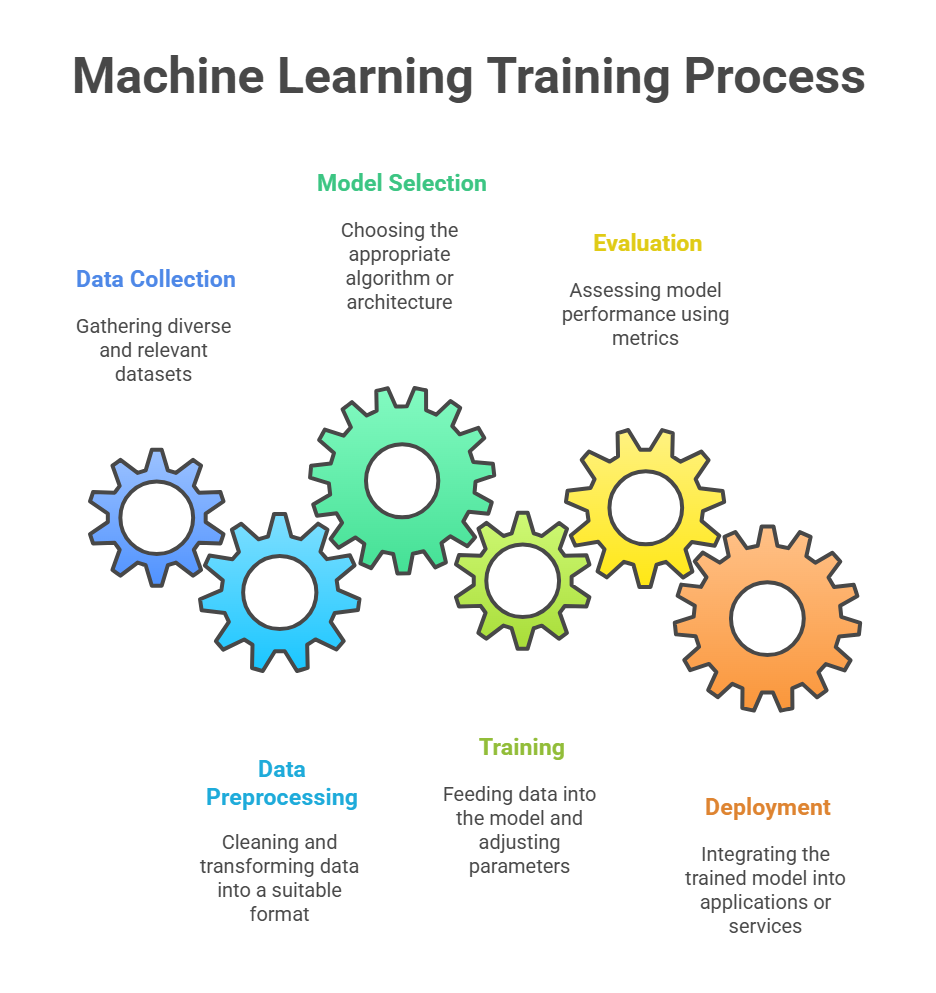
Data Collection: Gathering diverse and relevant dataets.
Data Preprocessing: Cleaning and transforming data into a suitable fomat.
Model Selection: Choosing the appropriate algorithm or architecure.
Training: Feeding data into the model and adjusting parameters to minimize erors.
Evaluation: Assessing model performance using metrics like accuracy and F1 sore.
Deployment: Integrating the trained model into applications or servces.
Real-World Applications: Azure's AI in Action 🌐
Microsoft Outlook's Suggested Replis: Utilizes Azure ML to train deep learning models for generating context-aware email respnses.
Azure AI Model Catalg: Offers a collection of pre-trained models from Microsoft and partners, ready for deployment in various applicaions.
🧠 Expert Insghts
Johan Bryssinck, AI/ML Product and Program Management Lead at Swift, highlights Azure's aproach
"Using Azure Machine Learning, we can train a model on multiple distributed datasets. Rather than bringing the data to a central point, we do the opposite. We send the model for training to the participants’ local computer and datasets at the edge and fuse the training results in a foundation model."
🚀 Concusion
Training AI models in Azure is a complex yet streamlined process, akin to training Pokémon for battle. With powerful tools and frameworks, Azure enables the development of intelligent applications that can transform indstries.
FAQ
1) How do I get started training a model in Azure? Start with Azure Machine Learning (Azure ML). Create a workspace, connect your data (Blob Storage or Data Lake), pick or create a compute, then use notebooks, AutoML, or pipelines to train. The Studio UI makes this easy if you prefer low code. 2) Which Azure service should I use: Azure Machine Learning or Cognitive Services? Use Cognitive Services when you want prebuilt AI (vision, speech, language) with minimal training. Use Azure ML when you need custom models, custom data, or full control over training, tuning, and deployment. 3) How do I store and prepare my training data? Put raw data in Azure Blob Storage or Data Lake. Use Azure ML datastores and datasets to version and access it. For prep, use Azure ML notebooks, Dataflows, or Spark (Azure Databricks/Synapse) to clean, label, and transform at scale. 4) What compute options do I have, and how do I scale? Azure ML offers compute clusters (auto-scale CPU/GPU), compute instances for dev, and attached compute like Databricks. Pick GPUs for deep learning, CPUs for classical ML. Use autoscaling and spot/low-priority VMs to balance speed and cost. 5) Should I use AutoML or bring my own training code? Use AutoML for quick baselines and structured data problems; it handles feature engineering and model selection. Bring your own code (PyTorch, TensorFlow, Scikit-learn) when you need custom architectures, training loops, or fine-grained control. 6) How do I deploy a trained model to production? Register the model in Azure ML, then deploy to Managed Online Endpoints for real-time, Batch Endpoints for offline scoring, or Azure Kubernetes Service for scalable, containerized inference. You can add autoscaling, authentication, and rollback. 7) How can I control costs while training? Right-size your compute, use autoscaling and job timeouts, prefer spot/low-priority VMs, cache datasets, and run experiments on smaller subsets first. Track runs to stop underperforming trials early, and shut down idle compute instances. 8) How do I handle experiment tracking and MLOps? Use Azure ML’s experiment tracking and MLflow for metrics, parameters, and artifacts. Build pipelines for repeatable training, use model registries for versioning, and enable monitoring for drift and performance. Integrate with Azure DevOps or GitHub Actions for CI/CD.
Learn IT the simplified way! ITCertificationJump.com


Write A Comment